Text alerts
BadgerBell is website monitoring, run by URLERT LLC, 5900 Balcones Drive, Suite 100, Austin, Texas 78731. This page says how we text people, what the texts say and how to stop them.
Who sends the texts, and what for
BadgerBell sends one kind of text: an alert about a monitor the person chose to be told about, when that website or server goes down or comes back. It also sends the one text with the code that confirms a phone number. We send no marketing and no offers by text, ever.
The texts
The code text, sent once when a person adds their number:
BadgerBell: your code is 123456. Msg&data rates may apply. Reply STOP to opt out.
A down alert, when a monitor the person picked goes down:
BadgerBell: [Nimbli] Nimbli health is down (nimbli.app/_health) since 14:02. Acknowledge: app.badgerbell.com/a/4KX9
A recovery text, when the last monitor in that incident is back:
BadgerBell: [Nimbli] Recovered: Nimbli health, after 12 minutes.
The part in square brackets is the project's name. It is left out when the team has only one project. Message and data rates may apply.
How a person opts in
Nobody is added to texts by someone else. A number is added only by the person who owns it, signed in to their own BadgerBell account:
- Sign in to BadgerBell and open Alerts, then SMS and voice.
- Press Add a number, type your own mobile number in international format, and tick the box that agrees to alert texts. The box is not ticked for you, and Text me a code waits until it is. The window also says how often you will get texts: message frequency depends on your monitors, and you get a text when one you picked goes down or recovers. Press Text me a code.
- BadgerBell texts a 6-digit code to that number. This is the only text a number gets before it is confirmed.
- Type the code in the code box and press Confirm. Only then is the number confirmed.
- A confirmed number gets alert texts for the monitors it was chosen for. An unconfirmed number gets no alert texts; its owner can ask for a new code.
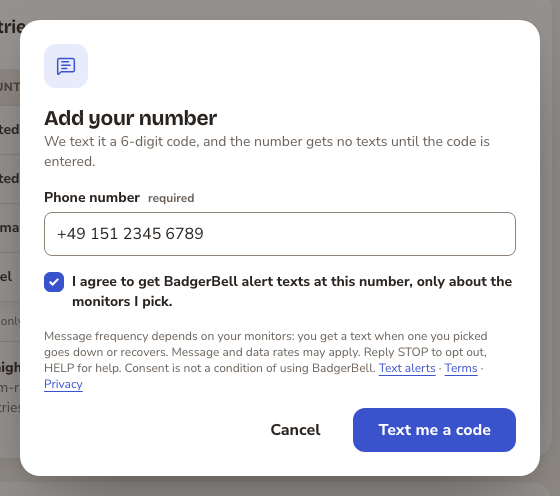
Step 2: the person types their own number, ticks the box that agrees to alert texts, and presses “Text me a code”.
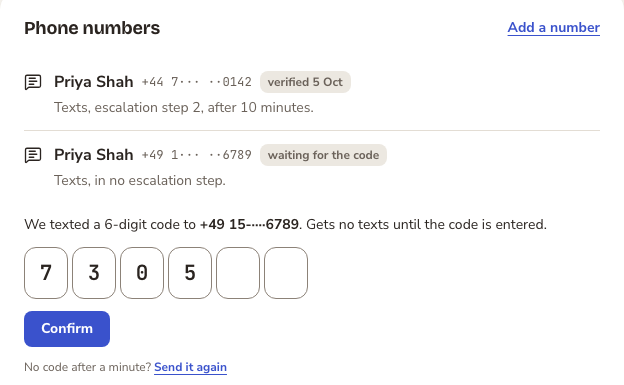
Steps 3 and 4: the code arrives by text, the person types it, and only then does the number get alerts.
By ticking the box and confirming their number, the person agrees to get these alert texts. They can stop them at any time, as below.
Keywords and replies
Twilio, our messaging provider, answers these replies for the number the texts come from.
- STOP (also UNSUBSCRIBE, CANCEL, END and QUIT): all texts from this number stop. The reply is: “You have successfully been unsubscribed. You will not receive any more messages from this number. Reply START to resubscribe.”
- START: texts begin again.
- HELP: the reply is: “BadgerBell alert texts. Help: [email protected]. Reply STOP to unsubscribe. Msg&data rates may apply.”
How often, and what it costs
- A text is sent only when a monitor the person picked goes down, and when it comes back. A person gets at most one down text for an incident, and one recovery text.
- Each team has a daily cap on texts. A text over the cap waits until midnight, in the team's time zone. A recovery text over the cap is not sent.
- A person's quiet hours can hold a text until they end.
- Message and data rates may apply.
Stopping texts in the app
Reply STOP to any text. Or sign in, open Alerts, open the number, and press Remove it. The number then gets no more texts. Or email [email protected].
More
Questions: [email protected]. How we treat your data: Privacy policy. The rules for using BadgerBell: Terms of Service.